- Go to Manager > Staff
- Choose relevant employee
- Select Equipment from the left sections
- Press Edit to the right of the equipment name you would like to update
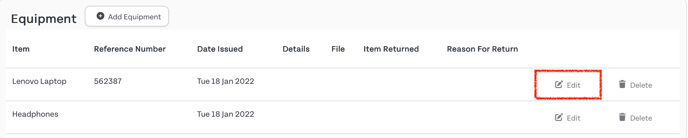
- Select the Item Returned date and Reason For Return
- Click Submit to save the changes
English
![HR_Duo SecondryLogo Black-3.png]](https://guide.hrduo.com/hs-fs/hubfs/HR_Duo%20SecondryLogo%20Black-3.png?height=40&name=HR_Duo%20SecondryLogo%20Black-3.png)